The Sticky Bit: That 't' at the End of /tmp
What that lowercase 't' in ls -lah /tmp actually means, why it exists, and the surprisingly old story behind it.
- #linux
- #unix
- #permissions
- #sysadmin
Run this on any Linux or macOS machine:
ls -lah /tmpAt the top you'll see something like:
drwxrwxrwt 18 root wheel 576B Jul 7 09:00 .
Notice the permissions: drwxrwxrwt. Everyone can read, write, and execute
into /tmp - but that last character is a t, not the x you might expect.
That t is the sticky bit.
What it actually does
The sticky bit on a directory changes the deletion rule. Normally, if you have
write permission on a directory, you can delete any file inside it - even
ones you don't own. That would be chaos in /tmp.
With the sticky bit set, you can only delete a file if:
- you own the file, or
- you own the directory, or
- you're root.
That's it. /tmp is world-writable so every process can create temp files, but
the sticky bit ensures process A can't delete process B's files. It's a simple
permission mechanism that prevents a whole class of accidental (and
not-so-accidental) interference between unrelated processes.
Reading the output
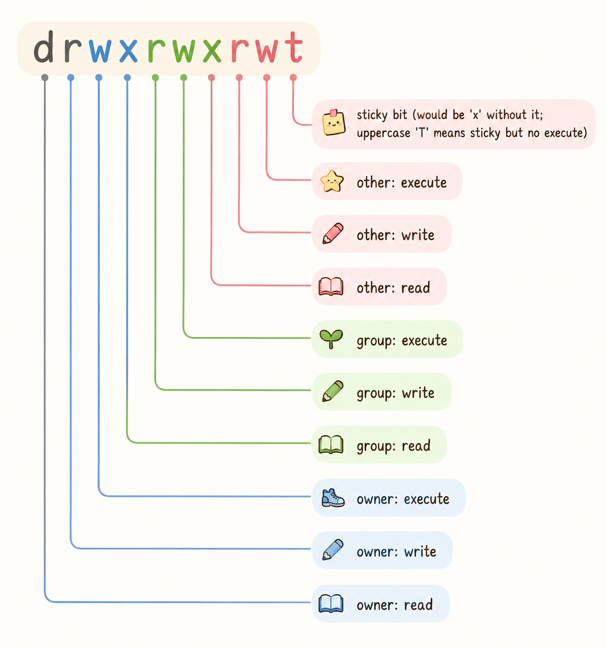
The T vs t distinction matters: lowercase t means other-execute is also
set (the normal case for /tmp). Uppercase T means the sticky bit is set but
other-execute is not - unusual, and usually a misconfiguration.
You can set it yourself with:
chmod +t /path/to/dir
# or with octal - the sticky bit is the leading 1
chmod 1777 /path/to/dir
The anecdote: it used to mean something completely different
Here's the part I find genuinely interesting. The sticky bit is old - it predates Linux entirely, going back to early Unix in the late 1960s and early 70s. But it didn't originally apply to directories. It applied to executables.
When set on a file, the sticky bit told the kernel: keep this program's text segment in the swap area even after it exits. The idea was that frequently-used programs (shells, editors, common utilities) would load faster because the kernel wouldn't bother evicting their code from swap between invocations. You were literally sticking the program to storage.
This made real sense in an era when RAM was measured in kilobytes and loading a
program from spinning disk was genuinely expensive. System administrators would
sticky-bit the programs users ran constantly - sh, ed, who - to reduce
load on the system.
By the time virtual memory and demand paging became the norm, the file sticky bit lost its original meaning. Modern kernels mostly ignore it on files. But the bit itself survived, and POSIX repurposed it for the directory behavior we still use today.
So when you see that t at the end of /tmp's permissions, you're looking at
a compatibility bit that outlived its original purpose by about 50 years, now
doing an entirely different job.
Quick sanity check for your own systems
If you're auditing a Linux box, world-writable directories without the sticky bit are a red flag:
find / -type d -perm -o+w ! -perm -1000 2>/dev/nullAny result that isn't intentional (a shared scratch directory you explicitly configured) deserves a closer look. World-writable without sticky means anyone on the system can delete anyone else's files in that directory - which is usually not what you want.